Get Started
Tabverse is a Chrome extension that turns a window full of related tabs into a named workspace you can put down and pick up again.
When you work on something, you usually open one Chrome window and a pile of tabs in it - searches, results, documents, tools, all about the same thing. That window and its tabs are a Tabverse. Tabverse gives the window a name, remembers it, and hangs the small things that go with the work - notes, todos, bookmarks, the tabs you closed - off it, so that when you are done (or just need a break) you can close the window without losing the thread.
Everything is local first: on its own, Tabverse needs no account and no network. Pairing with a server is optional and comes later.
Install
Tabverse is a Chrome extension (Manifest V3, Chrome 140 or newer).
The Chrome Web Store listing is still under review, so the store button on this site is disabled for now. In the meantime, install it from the GitHub release:
- Download
tabverse.zipfrom the GitHub releases. - Extract it to a folder, and keep that folder. Chrome loads a folder, not a zip; extracting each new version into the same folder keeps the extension id - and so your settings - stable, while a new folder is a new extension.
- Open
chrome://extensions, turn on Developer mode, click Load unpacked, and pick the extracted folder.
The
manual installation guide
walks the same steps through with screenshots. Developers can build dist/ from
source and load it unpacked; the
repository has the commands.
What it does
- Tabverses - one Chrome window is one workspace. Name it, save it, and restore it later with all its tabs. → Tabverses
- Todo, Note, Bookmark, History and AI Chat tools attached to the tabverse, each saved and restored with it. Pin one to the top, focus it, and the layout is remembered.
- One search across tabs, history, notes, todos and bookmarks.
- On-device AI that can chat about a page you attach, summarize a page into a note, or suggest a name for a tab collection, where Chrome ships its built-in model - and a page-to-Markdown viewer that needs no model at all.
- Optional server sync, so the same workspace is on every browser you use, with a server you run yourself.
Your first Tabverse
After installing, click the Tabverse T icon in Chrome's toolbar to open the
popup:
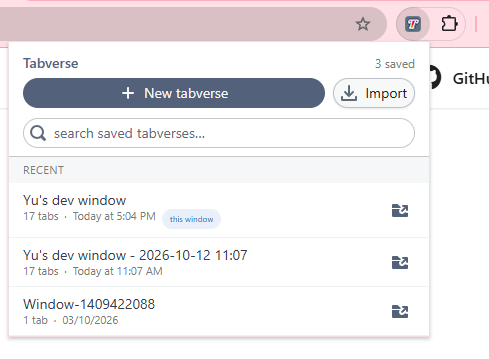
- New tabverse makes the current window a tabverse (if it already has one, Tabverse asks first - the current one is already saved).
- Import reads a
.tabversefile as a new saved tabverse. - The search box and the Recent list reach every tabverse saved in this browser; a row badged this window is the one you are in.
The Basic Usage pages walk the manager interface section by section.
Optional: server sync
Tabverse works entirely in this browser. If you want the same tabverses on a
second browser or machine, you can pair it with a tabversed server that
you run yourself; the extension talks only to the address you enter.
- Sync with a server - what syncs, how pairing works, and the privacy posture.
- Self-host a server - run
tabversedfor yourself.